> ## Documentation Index
> Fetch the complete documentation index at: https://docs.roostrr.com/llms.txt
> Use this file to discover all available pages before exploring further.
# Knowledge Base
> Upload and manage business information to train your voice agents on custom guidelines.
The Knowledge Base is a secure lookup system that allows your voice agents to access relevant business answers during active calls. Instead of stuffing menus, policies, or long guidelines directly into your agent's system prompt instructions, you can upload sources separately and link them to your agent.
 ## Creating a Knowledge Source
1. Navigate to the **Knowledge Base** tab in your dashboard.
2. Click **Add Source**.
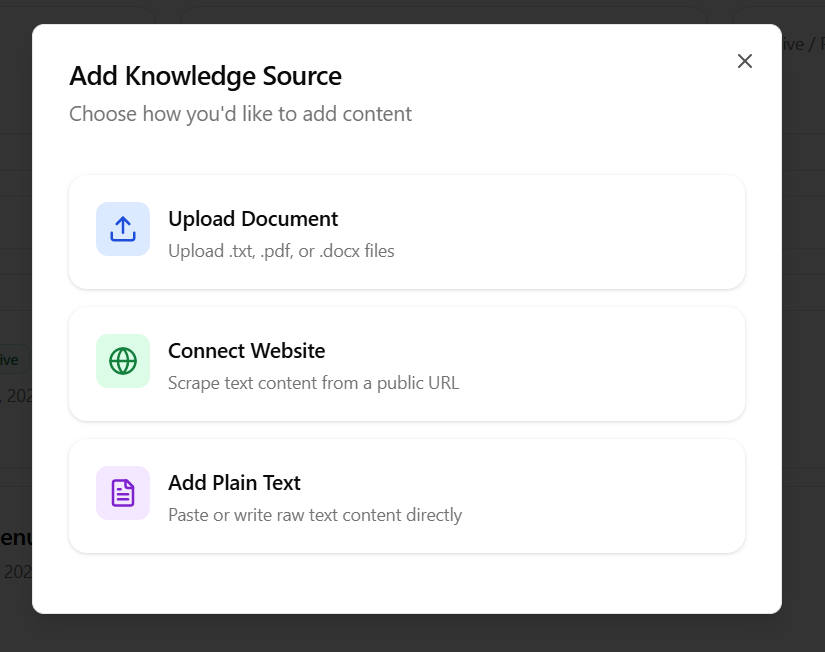
3. Choose one of the three ingestion methods:
### Method 1: Upload Document
Select this option to upload pre-existing documents:
* **Supported Formats:** `.txt`, `.pdf`, and `.docx` files.
* **Size Limits:** Large files are parsed and segmented automatically.
### Method 2: Connect Website
Select this option to scrape public content from a web page:
* **Website URL:** Enter the public link (e.g. `https://yourdomain.com/faq`). Roostrr will parse the visible text content from the page.
### Method 3: Add Plain Text
Select this option to write rules or FAQs directly in the dashboard:
* **Snippet Title:** A label for the text (e.g., *"Operating Hours"*).
* **Content:** Paste or write your plain text. Recommended for direct question-and-answer lists.
***
## Linking to Your Voice Agent
To make your uploaded knowledge source available to an agent:
1. Go to **Voice Agents** and click **Edit** on your agent.
2. Under the **Knowledge Base** card settings, click the dropdown and select your created source.
3. Toggle the **Enable Retrieval** switch to **ON**.
4. Save the agent. Your agent will now automatically refer to the document contents to answer user questions mid-call.
## Creating a Knowledge Source
1. Navigate to the **Knowledge Base** tab in your dashboard.
2. Click **Add Source**.
3. Choose one of the three ingestion methods:
### Method 1: Upload Document
Select this option to upload pre-existing documents:
* **Supported Formats:** `.txt`, `.pdf`, and `.docx` files.
* **Size Limits:** Large files are parsed and segmented automatically.
### Method 2: Connect Website
Select this option to scrape public content from a web page:
* **Website URL:** Enter the public link (e.g. `https://yourdomain.com/faq`). Roostrr will parse the visible text content from the page.
### Method 3: Add Plain Text
Select this option to write rules or FAQs directly in the dashboard:
* **Snippet Title:** A label for the text (e.g., *"Operating Hours"*).
* **Content:** Paste or write your plain text. Recommended for direct question-and-answer lists.
***
## Linking to Your Voice Agent
To make your uploaded knowledge source available to an agent:
1. Go to **Voice Agents** and click **Edit** on your agent.
2. Under the **Knowledge Base** card settings, click the dropdown and select your created source.
3. Toggle the **Enable Retrieval** switch to **ON**.
4. Save the agent. Your agent will now automatically refer to the document contents to answer user questions mid-call.