> ## Documentation Index
> Fetch the complete documentation index at: https://docs.roostrr.com/llms.txt
> Use this file to discover all available pages before exploring further.
# Phone Numbers & BYOC
> Rent phone numbers or connect your existing telecom carrier to link calls to your voice agents.
To connect your Roostrr voice agents to the telephone network, you can either rent new numbers directly through the dashboard or connect your existing telephone carrier systems via SIP Trunks.
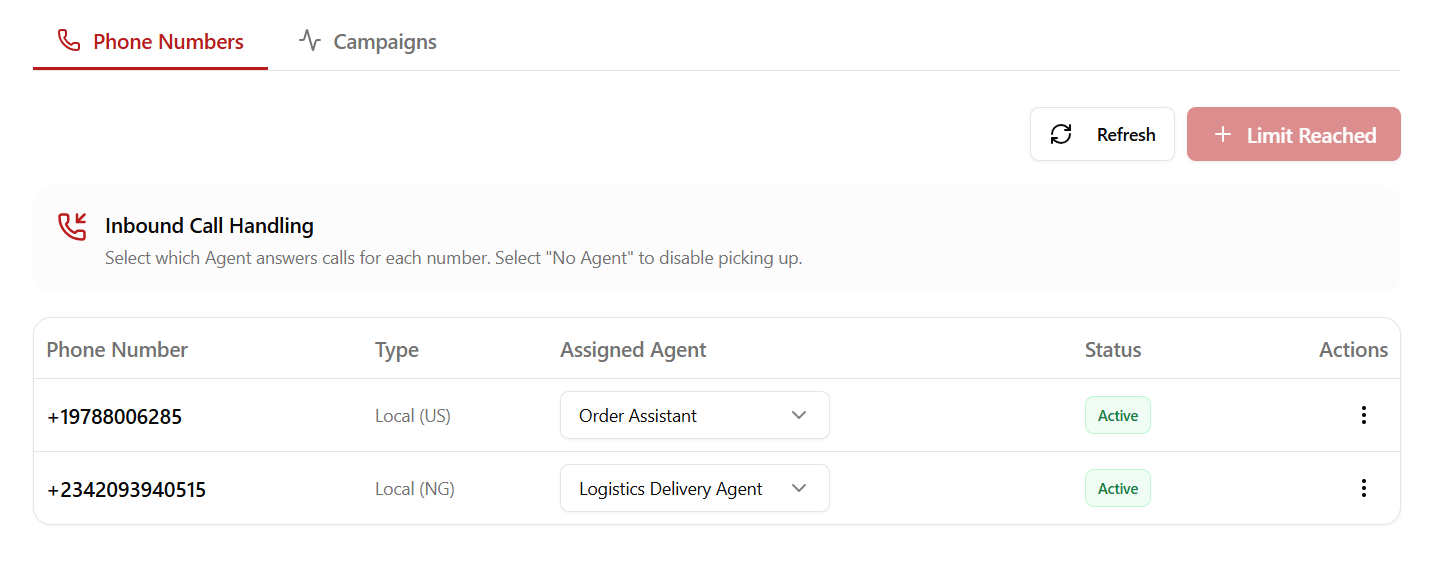
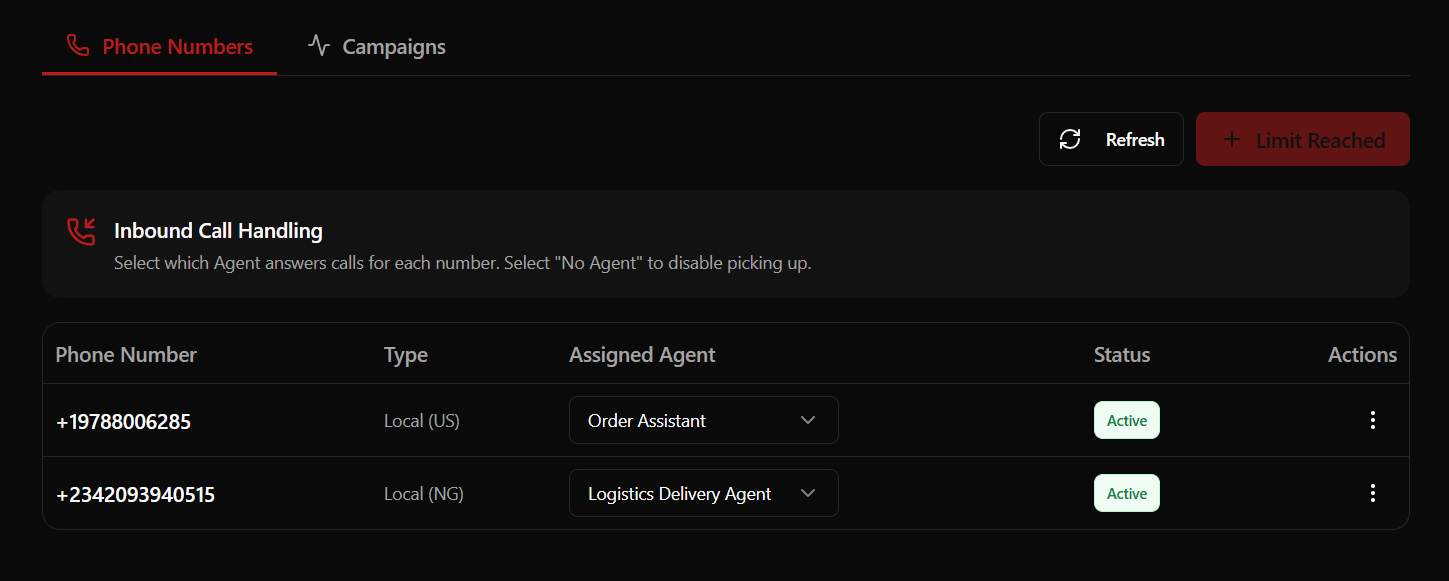 ## Renting Dedicated Numbers
You can purchase new local and mobile numbers directly from your dashboard under the **Phone** tab.
### Regional Pricing & Compliance
Pricing and compliance requirements vary based on the country:
| Country Region | Monthly Cost | Compliance Documents Required |
| :----------------------- | :----------- | :---------------------------- |
| **United States (+1)** | \$5 / month | No |
| **Canada (+1)** | \$5 / month | No |
| **United Kingdom (+44)** | \$5 / month | No |
| **Australia (+61)** | \$10 / month | Yes (Business Verification) |
| **South Africa (+27)** | \$10 / month | Yes (Business Verification) |
| **Nigeria (+234)** | \$5 / month | Yes (Business Verification) |
| **Kenya (+254)** | \$15 / month | Yes (Business Verification) |
> \[!IMPORTANT]
> **Compliance Verification:** Due to local telecommunications regulations, renting a number in Australia, South Africa, Nigeria, or Kenya requires business verification. You can securely upload the required regulatory documents within the dashboard after renting your number.
***
## Configuring Inbound Routing & Fallbacks
Once you have active numbers, you can configure how incoming calls are routed and manage spillover scenarios:
### 1. Route Mapping
Click **Configure** next to any phone number to map incoming traffic:
* **Custom Voice Agent:** Routes to any standard voice assistant in your workspace.
* **Specialized AI Staff:** Routes directly to a specialized vertical worker (e.g., a Restaurant Worker).
### 2. Emergency Fallback Number
To ensure you never miss critical calls, you can configure a fallback number for call spillovers:
* **Spillover Routing:** If your voice agent reaches its concurrency limits or encounters connectivity issues, the call is immediately routed to a designated physical phone number.
* **Setup:** In the configuration menu, select **Set Fallback Number**, enter the destination phone number including its country code (e.g., `+1...` or `+234...`), and save.
```mermaid theme={null}
graph TD
IncomingCall[Incoming Caller] --> CheckStatus{Agent Available?}
CheckStatus -->|Yes| RouteSelect[Route to Voice Agent / AI Staff]
CheckStatus -->|No / Concurrency Limit Reached| FallbackRoute[Spillover to Emergency Fallback Number]
```
### 3. Interactive Voice Response (IVR) / Call Menu
For phone numbers that need to route calls to multiple agents or departments, you can configure an interactive spoken menu:
* **Spoken Greeting Message:** The initial greeting spoken to the caller when they dial (e.g., *"Thank you for calling. Please select an option from the menu."*).
* **Option Mappings:** Map keypad digits (0-9) to route calls to specific **Voice Agents** in your workspace.
* **Option Announcement Message:** Customize the text prompt spoken for each specific key option (e.g., *"For support, press 1. For sales, press 2."*).
#### Call Flow Logic
When a caller dials a number with an IVR Call Menu active:
1. The greeting message is played first.
2. The announcement prompts for each configured option are read.
3. The platform waits for the caller to press a key.
4. If the option is valid, the call is immediately forwarded to the mapped Voice Agent.
```mermaid theme={null}
graph TD
IncomingCall[Incoming Caller] --> PlayGreeting[Play Greeting & Option Announcements]
PlayGreeting --> GatherInput{Wait for Key Press}
GatherInput --> RouteAgent[Route to Mapped Voice Agent]
```
***
## BYOC (Bring Your Own Carrier) via SIP Trunks
If your organization has pre-existing phone numbers, enterprise call center accounts, or a corporate telephone trunk, you can bridge them into Roostrr via **SIP Trunks**.
To manage your trunks, navigate to **Phone > SIP Trunks** in the dashboard.
### Trunk Configuration Parameters
When creating or editing a SIP Trunk, you configure the following parameters depending on the traffic direction:
#### General Settings
* **Trunk Name:** A unique label for identifying the trunk.
* **Trunk Direction:** Set to **Inbound** (receiving calls from your carrier) or **Outbound** (sending calls through your carrier). This cannot be changed after creation.
* **Numbers:** A comma-separated list of telephone numbers routed through this trunk.
* **Media Encryption (SRTP):** Select the encryption enforcement level:
* *Disabled:* Media packets sent unencrypted.
* *Enabled:* Encryption supported and negotiated.
* *Required:* Encryption enforced for all media traffic.
#### Inbound Settings (Receiving Calls)
Configure how Roostrr accepts calls routed from your SIP carrier:
* **Allowed Addresses:** A security whitelist of trusted carrier IP addresses or CIDR blocks (e.g. `192.168.1.1/32`). Use `0.0.0.0/0` to accept traffic from any address.
* **Include Headers:** Choose whether SIP headers are forwarded: *No headers*, *X headers*, or *All headers*.
* **Krisp Noise Cancellation:** Toggle this option to automatically filter out background noise on incoming customer audio streams.
#### Outbound Settings (Making Calls)
Configure how Roostrr authenticates and routes calls back to your carrier:
* **Address (SIP URI):** The target SIP gateway address of your provider (e.g., `sip.provider.com`).
* **Transport:** The connection transport protocol (*Auto*, *UDP*, *TCP*, or *TLS*).
* **Credentials:** Enter the optional **Username** and **Password** if your carrier gateway requires SIP digest authentication.
## Renting Dedicated Numbers
You can purchase new local and mobile numbers directly from your dashboard under the **Phone** tab.
### Regional Pricing & Compliance
Pricing and compliance requirements vary based on the country:
| Country Region | Monthly Cost | Compliance Documents Required |
| :----------------------- | :----------- | :---------------------------- |
| **United States (+1)** | \$5 / month | No |
| **Canada (+1)** | \$5 / month | No |
| **United Kingdom (+44)** | \$5 / month | No |
| **Australia (+61)** | \$10 / month | Yes (Business Verification) |
| **South Africa (+27)** | \$10 / month | Yes (Business Verification) |
| **Nigeria (+234)** | \$5 / month | Yes (Business Verification) |
| **Kenya (+254)** | \$15 / month | Yes (Business Verification) |
> \[!IMPORTANT]
> **Compliance Verification:** Due to local telecommunications regulations, renting a number in Australia, South Africa, Nigeria, or Kenya requires business verification. You can securely upload the required regulatory documents within the dashboard after renting your number.
***
## Configuring Inbound Routing & Fallbacks
Once you have active numbers, you can configure how incoming calls are routed and manage spillover scenarios:
### 1. Route Mapping
Click **Configure** next to any phone number to map incoming traffic:
* **Custom Voice Agent:** Routes to any standard voice assistant in your workspace.
* **Specialized AI Staff:** Routes directly to a specialized vertical worker (e.g., a Restaurant Worker).
### 2. Emergency Fallback Number
To ensure you never miss critical calls, you can configure a fallback number for call spillovers:
* **Spillover Routing:** If your voice agent reaches its concurrency limits or encounters connectivity issues, the call is immediately routed to a designated physical phone number.
* **Setup:** In the configuration menu, select **Set Fallback Number**, enter the destination phone number including its country code (e.g., `+1...` or `+234...`), and save.
```mermaid theme={null}
graph TD
IncomingCall[Incoming Caller] --> CheckStatus{Agent Available?}
CheckStatus -->|Yes| RouteSelect[Route to Voice Agent / AI Staff]
CheckStatus -->|No / Concurrency Limit Reached| FallbackRoute[Spillover to Emergency Fallback Number]
```
### 3. Interactive Voice Response (IVR) / Call Menu
For phone numbers that need to route calls to multiple agents or departments, you can configure an interactive spoken menu:
* **Spoken Greeting Message:** The initial greeting spoken to the caller when they dial (e.g., *"Thank you for calling. Please select an option from the menu."*).
* **Option Mappings:** Map keypad digits (0-9) to route calls to specific **Voice Agents** in your workspace.
* **Option Announcement Message:** Customize the text prompt spoken for each specific key option (e.g., *"For support, press 1. For sales, press 2."*).
#### Call Flow Logic
When a caller dials a number with an IVR Call Menu active:
1. The greeting message is played first.
2. The announcement prompts for each configured option are read.
3. The platform waits for the caller to press a key.
4. If the option is valid, the call is immediately forwarded to the mapped Voice Agent.
```mermaid theme={null}
graph TD
IncomingCall[Incoming Caller] --> PlayGreeting[Play Greeting & Option Announcements]
PlayGreeting --> GatherInput{Wait for Key Press}
GatherInput --> RouteAgent[Route to Mapped Voice Agent]
```
***
## BYOC (Bring Your Own Carrier) via SIP Trunks
If your organization has pre-existing phone numbers, enterprise call center accounts, or a corporate telephone trunk, you can bridge them into Roostrr via **SIP Trunks**.
To manage your trunks, navigate to **Phone > SIP Trunks** in the dashboard.
### Trunk Configuration Parameters
When creating or editing a SIP Trunk, you configure the following parameters depending on the traffic direction:
#### General Settings
* **Trunk Name:** A unique label for identifying the trunk.
* **Trunk Direction:** Set to **Inbound** (receiving calls from your carrier) or **Outbound** (sending calls through your carrier). This cannot be changed after creation.
* **Numbers:** A comma-separated list of telephone numbers routed through this trunk.
* **Media Encryption (SRTP):** Select the encryption enforcement level:
* *Disabled:* Media packets sent unencrypted.
* *Enabled:* Encryption supported and negotiated.
* *Required:* Encryption enforced for all media traffic.
#### Inbound Settings (Receiving Calls)
Configure how Roostrr accepts calls routed from your SIP carrier:
* **Allowed Addresses:** A security whitelist of trusted carrier IP addresses or CIDR blocks (e.g. `192.168.1.1/32`). Use `0.0.0.0/0` to accept traffic from any address.
* **Include Headers:** Choose whether SIP headers are forwarded: *No headers*, *X headers*, or *All headers*.
* **Krisp Noise Cancellation:** Toggle this option to automatically filter out background noise on incoming customer audio streams.
#### Outbound Settings (Making Calls)
Configure how Roostrr authenticates and routes calls back to your carrier:
* **Address (SIP URI):** The target SIP gateway address of your provider (e.g., `sip.provider.com`).
* **Transport:** The connection transport protocol (*Auto*, *UDP*, *TCP*, or *TLS*).
* **Credentials:** Enter the optional **Username** and **Password** if your carrier gateway requires SIP digest authentication.